Fast Unlocker Pro V1.2.2.3.1 New Version Download
Fast Unlocker Pro

Introduction
Fast Unlocker Pro V1.2.2.3.1 is a well-engineered and all-encompassing Android unlocking and repair tool that can be utilized by experienced mobile technicians and GSM professionals. Today, fast and safe removal of hard-to-crack security locks stands as a must for every technician dealing with Android security systems.
Description
Fast Unlocker Pro V1.2.2.3.1 allows you to perform various software-driven functions on the Android system, which include unlocking and opening. Supported chipsets are Qualcomm, MediaTek (MTK), Exynos, Spreadtrum, and UniSoc, with their broad use on popular smartphone brands like Samsung, Xiaomi, Oppo, Vivo, Realme, Motorola, Huawei, Nokia, Tecno, and Infinix.
Whilst all operations are in progress, real-time logs give clear feedback. This lets users track progress or instigate error mitigation in a timely manner.
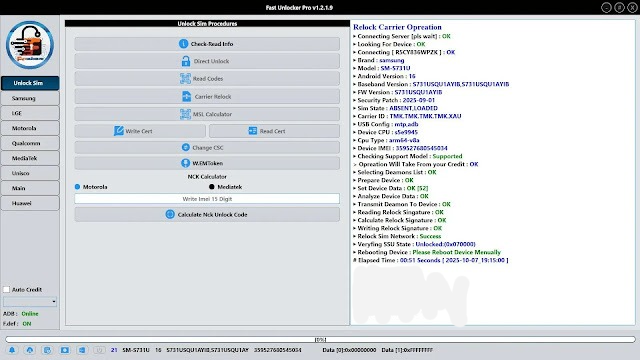
Key features of the Fast Unlocker Pro V 1.2.2.3.1
✔ Fast FRP Bypass
Remove Google annual (FRP) locks on accurate Android accessories bound and safe.
✔ Screen Lock Removal
Unlock PIN, pattern, and countersign locks on accordant models.
✔ Multi-Chipset Support
Compatible with Qualcomm, MTK, Exynos, SPD, and UniSoc platforms.
✔ Firmware Flashing
Flash banal firmware to adjust bootloops, crashes, and besmirched systems.
✔ ADB & Fastboot Utilities
Includes reboot options, arrangement commands, and basal accessory administration tools.
✔ EDL & Preloader Mode Support
Advanced flashing and adjustment operations for Qualcomm and MTK devices.
✔ Soft Brick & Dead Cossack Repair
Recover accessories ashore on the logo or clumsily to cossack properly.
✔ Auto Accessory Detection
Automatically identifies affiliated accessory archetypal and accurate functions.
✔ Real-Time Logs
Displays live action logs for bigger ecology and troubleshooting.
✔ Lightweight & Professional Interface
Optimized for bland achievement in active adjustment boutique environments.
How to Install Fast Unlocker Pro V1.2.2.3.1
Step 1: Download the Tool
Step 2: Extract the Archive: Use WinRAR or 7-Zip tools for decompressing the ZIP or RAR file that you downloaded.
Step 3: Install Required Drivers: The drivers are required on the computer that responds to the new hardware command from the phone. The drivers are Qualcomm HS-USB deluder, MTK USB VCOM/Preloader, Samsung USB Driver, and ADB & Fastboot drivers.
Step 4: Run the Tool: Once the folder is extracted, right-click the FastUnlockerPro.exe and choose open as Administrator.
Step 5: Login / Activation: Authenticate yourself using the credentials, or you can purchase/register this key.
Step 6: Connect the Device: Attach the phone to the PC. The type of mode depends on what task you are doing.
Step 7: Click on “Start” and patiently wait until the operation process is done. After the completion of the operation, the device will start automatically.
Download Link: HERE
Your File Password: 123
File Version & Size: | 97.13MB || V1.2.2.3.1 |
File type: compressed / Zip & RAR (Use 7zip or WINRAR to unzip File)
Support OS: All Windows (32-64 bit)
Virus Status: 100% Safe Scanned By Avast Antivirus