EFT Pro Dongle V5.3.7 Latest Version Free Download
EFT Pro Dongle update

Introduction
Nowadays, phone companies do not make it easier at all to fix a minor problem.
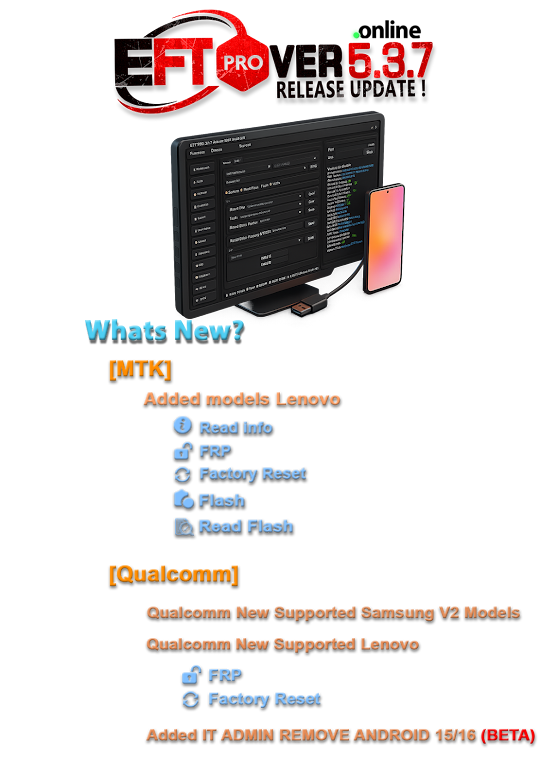
With the EFT update 5.3.7, we deliberately increased our stability and compatibility and revamped our performance.
Description
EFT Pro Dongle V5.3.7, as the name implies, is a stellar Windows-based service software cum dongle that uses the EFT Dongle license for authentication. One of the most important benefits of using this hard-wired feature is the outstanding performance of the tool with a significantly low error rate. The equipment is ultra-versatile and has extensive feature support for a broad spectrum of devices from several manufacturers, chipsets, and OS platforms.
If you are a reseller, customer, or official representative, you may need a box like EFT Pro for FRP service, flashing support, account operation, and system cleaning tasks on staffed phones. To put the concept into use, it talks with phones over ADB, Fastboot, Download Mode, and EDL, which depend on the type of operation or phone.
Key Features of EFT Pro Dongle V5.3.7
• Multi-brands supported with a single account
Supports cell phone companies from various countries like Samsung, Xiaomi, Oppo, Vivo, Huawei, Realme, Tecno, Infinis, etc.
• Multi-Chipset Supported
Works with Qualcomm, MediaTek (MTK), toxins, and Uniloc chipsets.
• FRP & Security services
Offers services dealing with FRP as well as security concerns involved in Android services.
- The advanced flashing support
Helps with the software as well as the unblocking of devices running on different platforms.
- Hardware-Based Authentication
The EFT dongle is employed as an authenticating module to ensure a stable and secure process of operation.
- ADB, Fastboot & EDL Functions
The appealing thing about ADB, Fastboot & EDL functions is that they support multiple communication modes for in-depth system access, such as repairing and other advanced tasks.
- Clean & Professional Interface
The clean and professional interface acts as the core system where errors are seen to be low, as one’s work is efficiently done with ease.
- Regular Updates
The app is frequently updated to ensure that all older devices are compatible with new smartphone models as well as security patches that are released.
- Stable & Reliable Performance
The device is particularly suited for industrial use cases, where it is required to work reliably with very little downtime.
How to Install and Use EFT Pro Dongle V5.3.7
Step 1: System Essentials
Check the boxes for your system requirements before proceeding:
Windows 7, 8, 10, or 11 (64-bit highly recommended).
EFT Pro Dongle
Constant stable internet connection (in order for you to get the updates)
Step 2: Download the Tool
Step 3: Install EFT Drivers
Go ahead now and install all compulsory EFT USB drivers contained in the standard installing.
Step 4: Connect EFT Dongle
Once the EFT dongle has been located, connect it to your computer.
Step 5: Run the EFT Tool as Administrator
Open the EFT Dongle application
Right-click on the .exe or shortcut and run as administrator
Step 6: Connect the desktop to the device
Turn on the computer
Link it up to the computer by USB cable
Step 7: Engaging in the requisite process
Select the representation detail (brand and the model).
Choose the operation you need to take part in.
Download Link: HERE
Your File Password: 123
File Version & Size: | 79.72 MB || V5.3.7 |
File type: compressed / Zip & RAR (Use 7zip or WINRAR to unzip File)
Support OS: All Windows (32-64 bit)
Virus Status: 100% Safe Scanned By Avast Antivirus