
Introduction
Canon Service Tool V6.310 is a specialized utility designed for servicing and maintaining Canon printers. It is widely used by technicians and advanced users to perform maintenance functions such as resetting waste ink counters, clearing service errors, and restoring printer functionality after technical issues. If your Canon printer displays error messages related to ink absorbers or maintenance status, this tool can help resolve those problems efficiently.
In today’s world, where printers play an important role in home offices, schools, and businesses, having a reliable maintenance tool is essential. Canon Service Tool V6.310 is known for its easy interface and powerful capabilities, making it a popular choice among printer repair experts and users who want to extend the life of their devices.
Overview
Canon Service Tool V6.310 is a software utility developed for troubleshooting and servicing compatible Canon inkjet printers. The primary purpose of this tool is to reset internal printer counters and perform service-level operations that are normally inaccessible through standard printer settings.
Many Canon printers track maintenance activities internally, including the amount of ink absorbed during cleaning cycles. Once these counters reach a certain limit, the printer may stop working and display warnings like “Waste Ink Absorber Full.” This is where Canon Service Tool V6.310 becomes extremely useful — it allows users to reset these counters and restore normal operation.
This tool is especially popular among printer technicians because it helps reduce downtime and avoids unnecessary hardware replacements.
Description
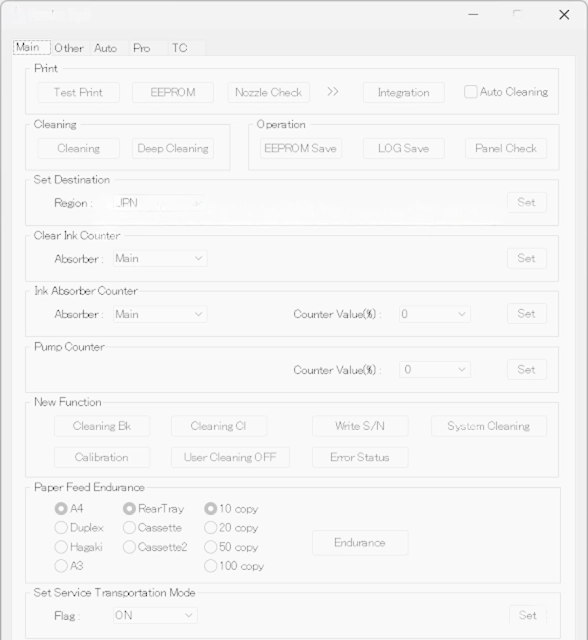
Canon Service Tool V6.310 provides advanced maintenance options for Canon printers through a simple and user-friendly interface. Unlike regular printer utilities, this service tool operates in service mode, giving access to hidden maintenance features.
Users can perform actions such as EEPROM reset, ink counter reset, test printing, and cleaning commands. It supports a wide range of Canon printer models, particularly PIXMA series printers. The software helps diagnose printer issues quickly and allows users to perform repairs without needing expensive service center visits.
Key Features of Canon Service Tool V6.310
Here are the main features of Canon Service Tool V6.310 that make it a powerful utility:
1. Waste Ink Counter Reset
Reset the waste ink absorber counter when your printer shows service errors related to ink overflow.
2. EEPROM Information Print
Allows users to print detailed printer information for diagnostics and maintenance records.
3. Service Mode Support
Works in Canon printer service mode, unlocking advanced repair and maintenance options.
4. Ink Absorber Reset
Quickly clear ink absorber warnings and restore printer functionality.
5. Test Print Function
Run nozzle checks and test pages to verify printer performance after repairs.
6. Cleaning and Deep Cleaning Options
Perform maintenance cleaning cycles to improve print quality and remove clogged nozzles.
7. User-Friendly Interface
Simple layout that makes navigation easy even for beginners.
8. Time-Saving Tool for Technicians
Helps service professionals quickly troubleshoot and repair printers without manual procedures.
How To Install of Canon Service Tool V6.310
Follow these steps to install and use Canon Service Tool V6.310 safely:
-
Download the Tool
Get the Canon Service Tool V6.310 file from a trusted source. -
Extract the Files
If the file is compressed (ZIP or RAR), extract it using WinRAR or 7-Zip. -
Disable Antivirus Temporarily (Optional)
Some security software may detect service tools as unknown utilities. -
Run as Administrator
Right-click the executable file and select Run as Administrator. -
Connect Printer via USB
Ensure your Canon printer is connected through USB and turned on. -
Enter Service Mode
Put your printer into service mode using the proper button combination (varies by model). -
Launch the Tool
Open Canon Service Tool V6.310 and select the required function. -
Perform Required Reset or Maintenance
Choose options such as Ink Counter Reset or Test Print. -
Restart Printer
After completing the process, restart your printer to apply changes.
Download Link: HERE
Your File Password: GSMLabSolution.com
File Version & Size: | V6.310 || 24.10 MB |
File type: compressed / Zip & RAR (Use 7zip or WINRAR to unzip File)
Support OS: All Windows (32-64 bit)
Virus Status: 100% Safe Scanned By Avast Antivirus
