Introduction
MDM Fix Tool V1.0.9.5 is a dedicated Android application targeted at MDM limitations and allows experts and advanced users to handle them with the help of the supported devices with mobile phones and tablets.
description
The tool is commonly used in mobile repair shops to address corporate or organizational device locks that prevent normal usage.
Key features of MDM Fix Tool V1.0.9.5:
MDM Lock Detection and Fixing—automatically detect and remove MDM restrictions on the supported Android gadgets.
Latest Android Security Support—product optimized for new Android versions and latest security updates.
Multi-Chipset Compatibility—power Qualcomm and MTK-based devices.
ADB and Fastboot Operations—Appoint MDM-related commands and system operations.
EDL Mode Support—Service any brick-compatible Qualcomm devices.
Auto Device Detection—The tool can accurately recognize the device model and status of MDM.
Professional GSM Tool—The tool is designed to facilitate working operations of phone repair and service center professionals.
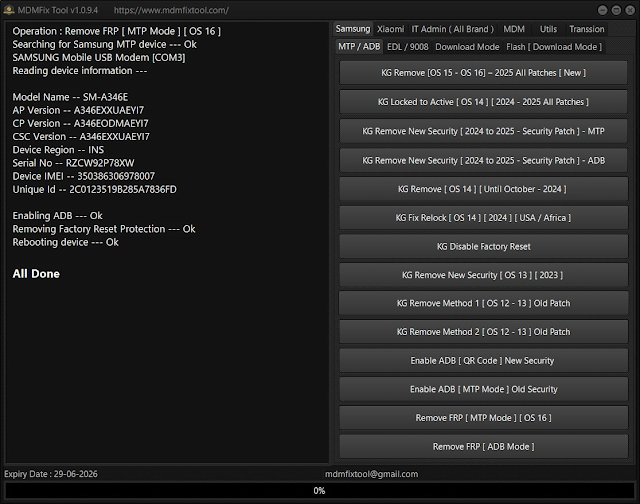
How to Install of MDM Fix Tool V1.0.9.5
Step 1—Download the Tool
Locate the link below the desirable file and press “Download.” You may consider downloading the tool from relevant websites, forums, or other reputable sources as well.
Step 2—Extract the File
Use WinRAR or 7-Zip; both are file archiving utilities, and each is familiar with RAR and ZIP compressed files for safe file extraction or file splitting.
Step 3—Install Required Drivers
The relevant drivers are Qualcomm’s HS-USB deluder drivers, MTK USB VCOM/prelude drivers, Samsung USB drivers, and ADB & Fastboot drivers.
Step 4—Run the Tool
Launch the MDMFixTool.exe by right-clicking on the .exe file and choosing “Run as administrator.”
Step 5—Select MDM Fix Option
Go through the provided settings and make use of the particular MDM fix that suits the purpose you need it for.
Step 6—Start the Process
Click “Start” and wait for the device to restart. The reboot will happen after the operation completes successfully.
Download Link: HERE
Your File Password: 123
File Version & Size: | 113.74 MB || V1.0.9.5 |
File type: compressed / Zip & RAR (Use 7zip or WINRAR to unzip File)
Support OS: All Windows (32-64 bit)
Virus Status: 100% Safe Scanned By Avast Antivirus