Introduction
XBL Hash Extractor Pro Tool is a professional Android servicing utility designed specifically for extracting XBL (eXtensible Bootloader) hash values from Qualcomm-powered devices. In modern Android smartphones, especially those running on Qualcomm Snapdragon chipsets, security mechanisms have become increasingly complex. Bootloader components such as XBL play a crucial role in secure boot verification and device authentication.
When technicians need to perform advanced operations like EDL flashing, authentication bypass preparation, or loader matching, extracting the correct XBL hash becomes essential. This is where the XBL Hash Extractor Pro Tool provides a powerful and reliable solution.
If you are searching for a Qualcomm XBL hash extraction tool for Windows PC, this Pro version offers improved accuracy, faster processing, and enhanced compatibility with newer Android security systems.
Overview
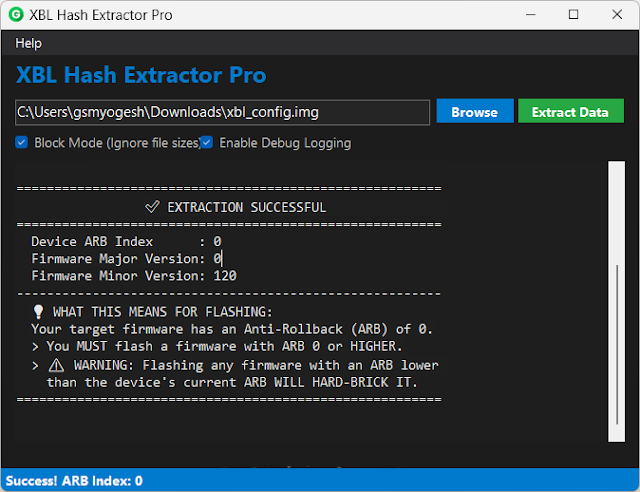
XBL Hash Extractor Pro Tool is a Windows-based utility developed for GSM technicians and advanced Android repair professionals. The primary purpose of the tool is to extract the XBL hash from Qualcomm firmware or directly from connected devices operating in EDL mode.
The XBL (eXtensible Bootloader) is part of Qualcomm’s secure boot chain. The hash value generated from XBL is often required for:
-
Loader authentication
-
Secure flashing procedures
-
Advanced unlocking processes
-
Research and development tasks
This tool supports multiple Qualcomm Snapdragon chipsets and is frequently used in professional repair environments where precision and reliability are critical.
The Pro version improves compatibility with modern devices running recent Android versions and updated security patches.
Description
The XBL Hash Extractor Pro Tool is designed to simplify a complex technical process. In Qualcomm-based smartphones, secure boot ensures that only verified software components are executed during startup. The XBL component is one of the first stages of this boot process.
For certain advanced repair or development tasks, technicians may need to:
-
Extract XBL files from firmware packages
-
Generate XBL hash values
-
Match loader authentication requirements
-
Analyze boot security components
Manually extracting and calculating XBL hashes can be technically challenging and prone to errors. This tool automates the process by scanning firmware files or reading data directly from devices in EDL (Emergency Download) mode.
Once extracted, the tool displays the hash value in a structured format, making it easier to use for further authentication or research purposes.
The Pro version offers improved stability, faster detection speed, and broader chipset support compared to earlier builds.
Key Features:
Below are the main features of the XBL Hash Extractor Pro Tool:
1. XBL Hash Extraction
Accurately extracts XBL hash values from firmware or connected Qualcomm devices.
2. EDL Mode Support
Works with devices in Qualcomm 9008 Emergency Download Mode.
3. Firmware File Scanning
Scans firmware packages to identify and extract XBL components automatically.
4. Multi-Chipset Compatibility
Supports various Qualcomm Snapdragon processor series.
5. Fast Processing Speed
Generates hash results quickly with minimal waiting time.
6. Structured Output Display
Displays extracted hash values in a clean and readable format.
7. Lightweight Software
Small file size with minimal system resource usage.
8. Error Log Reporting
Provides detailed logs for troubleshooting extraction issues.
9. Professional Interface
Designed for GSM technicians and advanced Android users.
10. Improved Stability (Pro Version)
Enhanced compatibility with newer Android security updates.
How To Install XBL Hash Extractor Pro Tool
Follow these steps to install and use the tool properly:
Step 1: Download the Tool
Download the XBL Hash Extractor Pro Tool from a trusted GSM resource.
Step 2: Extract the Package
If the file is compressed (ZIP or RAR), extract it using WinRAR or 7-Zip.
Step 3: Install Qualcomm USB Drivers
Install Qualcomm USB drivers to ensure proper device detection in EDL mode.
Step 4: Disable Antivirus (If Needed)
Some advanced repair tools may be flagged as false positives.
Step 5: Run as Administrator
Right-click the tool executable file and select “Run as Administrator.”
Step 6: Connect Device or Load Firmware
Either connect your device in EDL mode or load the firmware folder containing XBL files.
Step 7: Start Extraction
Click the “Extract Hash” button and wait for the process to complete.
Step 8: Save Output
Copy or export the generated XBL hash value for further use.
Download Link: HERE
Your File Password: 123
File Version & Size: | 14.96 MB |
File type: compressed / Zip & RAR (Use 7zip or WINRAR to unzip File)
Support OS: All Windows (32-64 bit)
Virus Status: 100% Safe Scanned By Avast Antivirus