ColokTool Pro 2026.05.05 Free Download Tested 100%
ColokTool Pro 2026.05.05

Introduction
The smartphone maintenance sector is very competitive, so besides the necessary tools and skills, product knowledge is essential. Some commonly seen software issues are as follows: FRP locks, firmware corruption, boot loops, and screen lock issues. These issues require expert fixing solutions.
It is a generic application for expert technicians and amateur users to operate.
It guarantees a longer duration and quicker processes and accommodates the latest versions of Android.
Overview
ColokTool Pro 2026.05.05 is a robust Android phone repair tool displayed in a professional way for the sake of simplified smartphone service operations in this sphere. It has also minimized the need for other tools by combining various repair and maintenance tasks.
One of the consensus advantages is a comprehensive brand list in the ColokTool Pro software.
An intuitive interface is a characteristic of our company.
Description
ColokTool Pro 2026.05.05 (New Version) is programmed to meet a wide range of Android software-based difficulties. The malfunction of system software, system crashing, and all your losses of data might be the reason for the appearance of boot loops, FRP, PIN,, etc.
Device failure due to the mentioned issues can completely wipe out all forms of data and configurations on the platform. This repair process provides for OS reinstallation for phones whose system software has been damaged.
Further, the unlocking of FRP from the supported Android smartphones is one of the basic characteristics of this utility. With the factory reset, this function provides the possibility of bypassing Google account verification.
Key Features
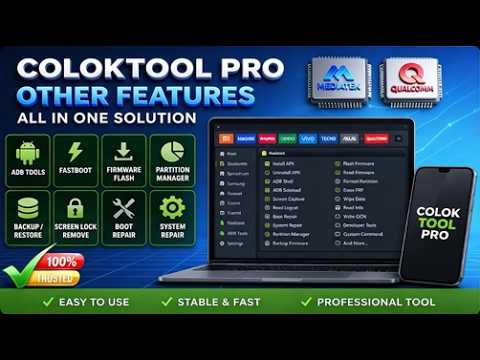
ColokTool Pro 2026.05.05 emphasizes several high-level functions often necessary for specialists dealing with different Android-related issues.
Firmware Flashing
Include the ability to install or reinstall firmware in order to tackle software problems.
Device Unlocking
Uplift the lock of passwords, patterns, screen lock, and PIN on an as-needed basis.
FRP Removal
It’s a bypass FRP service that necessarily comes in handy for some Android devices as they are tied to account verification post a factory reset, which is securely done.
Multi-Brand Support
Features support for the usage of many Android-based (supported) devices.
ADB and fastboot support
Professionals can count on stable device traffic only with ADB and fastboot protocols.
Device Information Reader
Informs customers about their phone’s object-specific properties.
Fast Processing Engine
Ready to pull ahead with correct and efficient tasks.
Stable Performance
Best evident in highly evolved system stability.
How to Install ColokTool Pro 2026.05.05
Step 1:
First of all, obtain the ColokTool Pro 2026.05.05 Android repair software package from a reliable resource for it, e.g., a mobile repair software specialist.
Step 2:
Unzip the extracted archive from the ZIP or RAR file by using unzip or 7-Zip.
Step 3:
Drive into the decompressed folder to find the launch file created for installation.
Step 4:
Apply the installation of the mandatory USB drivers and ADB drivers to best condition the device communication standard.
Step 5:
After the download process is over, run the setup file and follow the instructions of the installation process that appear on the screen.
Step 6:
As soon as the software is installed, whether you are a single person or a firm that uses it, make sure to run it as an administrator.
Step 7:
Go to the Developer Options section on your microcomputer and then turn USB debugging on the Android device.
Step 8:
Use a USB cable to connect the two devices and start the tool for your gadget.
Download Link: HERE
Your File Password: Gsmlabsolution.com
File Version & Size: | 509.12 MB || 2026.05.05 |
File type: compressed / Zip & RAR (Use 7zip or WINRAR to unzip File)
Support OS: All Windows (32-64 Bit)
Virus Status: 100% Safe. Scanned By Avast Antivirus