Introduction
Unlock Tool 2026.02.20.0 is the latest version of one of the most powerful and reliable mobile phone servicing solutions available for professional technicians. Designed to handle advanced Android and iOS repair operations, Unlock Tool has become a trusted choice in the mobile repair industry. With continuous updates and improved device compatibility, the 2026.02.20.0 version introduces enhanced stability, broader chipset support, and optimized unlocking algorithms.
In today’s fast-evolving smartphone market, technicians require a secure, fast, and efficient unlocking and flashing tool. Unlock Tool 2026.02.20.0 meets these demands by offering advanced features such as FRP removal, bootloader unlock, flashing firmware, IMEI repair (where legally permitted), and screen lock bypass. This article provides a complete overview, installation guide, system requirements, and key features to help you understand why Unlock Tool is considered a leading mobile repair software in 2026.
Overview
Unlock Tool 2026.02.20.0 is a Windows-based professional servicing software developed for repairing, unlocking, and flashing smartphones. It supports a wide range of brands, including Samsung, Xiaomi, Oppo, Vivo, Realme, Huawei, and many more. The tool is widely used in GSM repair shops due to its user-friendly interface and powerful backend repair engine.
This latest update focuses on:
-
Improved Qualcomm, MediaTek, and Exynos chipset support
-
Enhanced FRP unlock methods
-
Faster flashing process
-
Bug fixes and performance optimization
-
Extended security patch compatibility
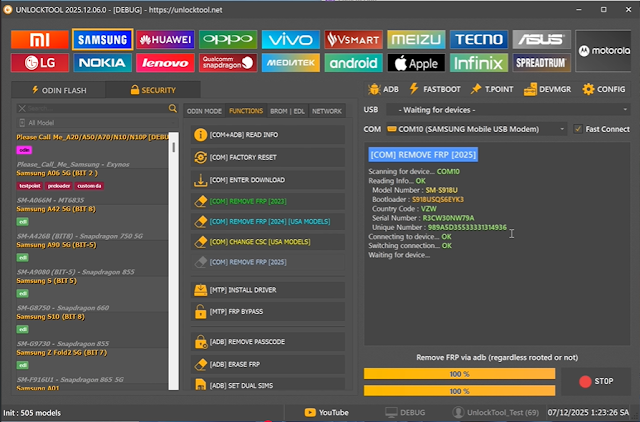
Unlock Tool operates via USB connection and supports multiple device modes such as ADB Mode, Fastboot Mode, EDL Mode, Download Mode, and Recovery Mode. Its structured dashboard allows technicians to perform complex procedures in just a few clicks.
Description
Unlock Tool 2026.02.20.0 is engineered to solve common and advanced smartphone software issues. Whether a device is stuck on the logo, locked due to forgotten credentials, or affected by firmware corruption, this tool offers professional-grade solutions.
One of the standout aspects of Unlock Tool is its automatic detection system. Once a device is connected, the software identifies the model and chipset to suggest compatible operations. This reduces user error and improves success rates.
The tool also supports secure FRP (Factory Reset Protection) bypass methods for Android devices, helping technicians unlock devices responsibly when proper ownership verification is provided. Additionally, it provides firmware flashing capabilities to restore devices to factory condition, fix bootloop issues, and upgrade or downgrade system versions.
Unlock Tool 2026.02.20.0 is continuously updated to stay compatible with the latest Android security patches released in 2026, making it a future-ready solution for mobile repair professionals.
Key Features of Unlock Tool 2026.02.20.0
Below are the core features of Unlock Tool 2026.02.20.0:
1. FRP Lock Removal
Remove Google Factory Reset Protection on supported Android devices safely and efficiently.
2. Screen Lock Bypass
Unlock pattern, PIN, password, and fingerprint locks for authorized servicing.
3. Firmware Flashing
Flash official stock firmware to repair software corruption, remove malware, or upgrade/downgrade Android versions.
4. Bootloader Unlock & Relock
Unlock or relock the bootloader on supported devices to enable advanced customization.
5. Qualcomm & MediaTek Support
Advanced operations via EDL Mode and BROM Mode for deep-level repairs.
6. IMEI & Network Repair (Legal Use Only)
Repair network-related issues where legally permitted.
7. One-Click Operations
Perform complex procedures with simplified one-click solutions.
8. Safe Mode Operations
Reduced risk of device bricking during critical processes.
9. Automatic Model Detection
Quickly identifies connected device models for accurate operation.
10. Regular Updates
Frequent updates ensure compatibility with the latest Android security patches and new device models.
How To Install Unlock Tool 2026.02.20.0
Follow these steps carefully to install Unlock Tool on your PC:
Step 1: Download the Latest Version
Download Unlock Tool 2026.02.20.0 from the official source or licensed reseller.
Step 2: Extract the Files
If the file is compressed (ZIP or RAR), extract it using WinRAR or 7-Zip.
Step 3: Disable Antivirus Temporarily
Some security software may flag servicing tools as false positives. Temporarily disable antivirus if necessary.
Step 4: Install USB Drivers
Install required USB drivers for Qualcomm, MediaTek, Samsung, and other supported brands.
Step 5: Run Setup as Administrator
Right-click the installer and choose “Run as Administrator.”
Step 6: Complete Installation
Follow on-screen instructions to finish setup.
Step 7: Restart Your Computer
Restarting ensures drivers and components function properly.
Step 8: Login or Activate
Open Unlock Tool and log in using your registered account or activation key.
Step 9: Connect Your Device
Put the device into the required mode (ADB, Fastboot, EDL, etc.) and begin servicing.
Download Link: HERE
Your File Password: 123
File Version & Size: | 227.73 MB || V2026.02.20.0 |
File type: compressed / Zip & RAR (Use 7zip or WINRAR to unzip File)
Support OS: All Windows (32-64 bit)
Virus Status: 100% Safe Scanned By Avast Antivirus